



RK3288-C based CTL J4+ Chromebook, priced at under $200!
2016-05-09
The humble Chromebook has gone through many revisions since its inception nearly five years ago. Originally designed as a low-cost notebook running the Google Chrome OS and connected to the cloud for everyday work, there are now ultra-premium models such as the Pixel, a wider range of touchscreen-enabled designs primarily from Asus, as well a bevy of entry-level offerings that target value above all else.
This budget end of the market is dominated by Chromebooks powered by the ARM architecture. Chief amongst the proponents of this Internet-connected device is Chinese chipmaker Rockchip, whose RK3288 system-on-chip processor powers a number of Chromebooks for the consumer and education markets.
Found in Chromebooks from Asus, Haier and HiSense, as well as the novel Chromebit, the RK3288(C) SoC is also present in education-focussed notebooks made popular by CTL. Priced at under $200 for the best-in-breed J4+, we have one in for evaluation today.
Under the hood: RK3288C
But before we get to the Chromebook it is instructive to take a peek at what makes the RK3288 SoC an ideal fit for these devices. The RK3288 uses two of ARM's best-known technologies - Cortex A-class processor and Mali graphics - and then wraps them inside a fully-baked SoC with display, memory, camera and connectivity support.
The Cortex-A17, which is ostensibly a speed-bumped version of the Cortex-A12, is arranged in a quad-core configuration and scales up to 1.8GHz. Though now superseded by the Cortex-A57 and Cortex-A72, the 32-bit-only processor remains a potent choice for an entry-level Chromebook. Graphics oomph is provided by the Mali-T760 GPU also in a quad-core configuration, and its performance in a range of last year's premium handsets bodes well for the kind of work that Chromebook users will engage in on a daily basis.
The rest of the SoC treads familiar ground. There's a dual-channel 64-bit memory controller supporting DDR3/L memory, 4K-capable HDMI-out, an H.264 video encoder/decoder, and 13MP ISP for snapping duties.
The point to appreciate is that a budget SoC provides enough general chutzpah for a fluid experience on a Chromebook. We've seen this proved empirically with the evaluation of the similar, yet more expensive, Chromebook Flip from Asus.
The CTL J4+
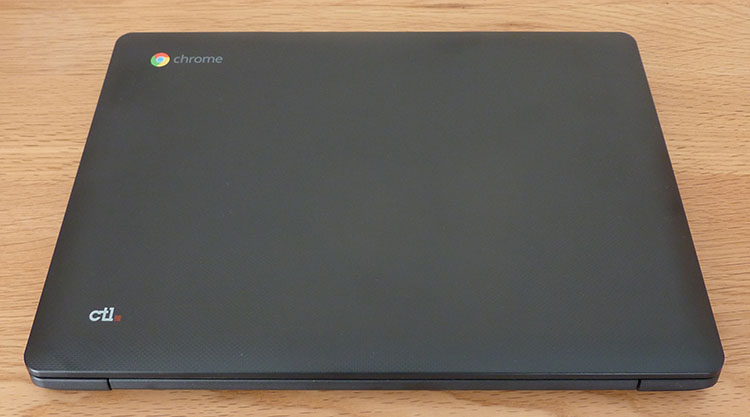
Designed primarily for the classroom but available to purchase from a selected number of retailers for regular customers, the CTL J4+ is solid enough to withstand the usual knocks that might be expected in an education environment. The carbon-like pattern is, as you would expect, made of plastic, but it's of a high quality throughout. Grabbing the sides of the Chromebook in both hands results in very little flex. Indeed, we've seen full-on notebooks costing multiple times more having inferior build quality.
That said, the lid, although a dark grey, is a magnet for fingerprints. The slightest bit of grease or moisture shows up, so you'll be rubbing it away constantly to ensure it's kept nice and clean. Portability is a key concern for the education market, too; the J4+'s 1,124g weight is very competitive against other Chromebooks of a similar bearing, while the total travel weight, including small power charger, is less than 1,500g. My 11-year-old niece felt it was portable enough to be carried in a rucksack during the daily 15-minute walk to school.
 |
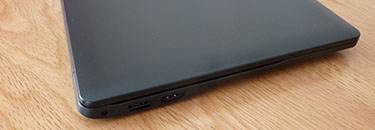 |
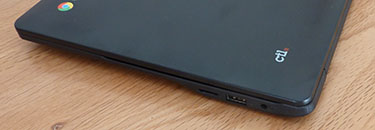
There are inevitable compromises when retailing a sub-$200 Chromebook. One area where the J4+ falls slightly short is shown by a lack of USB 3.0. An older, slower port lines either side, with HDMI-out and a micro-SD card-reader also available. Though it would be nicer to have USB 3.0, the question we ask ourselves is whether it makes much of a real-world difference on a machine that's purposely designed to be used almost exclusively with the Internet?
Other than the previously mentioned quad-core Rockchip SoC operating at up to 1.8GHz, this Chromebook is supported by 16GB of eMMC storage, 4GB of DDR3L memory, 802.11ac WiFi, Bluetooth 4.0, and an integrated, 3,400mAh battery promising up to nine hours of regular usage from a single charge. A couple of 1.5W speakers offer rudimentary sound capabilities.
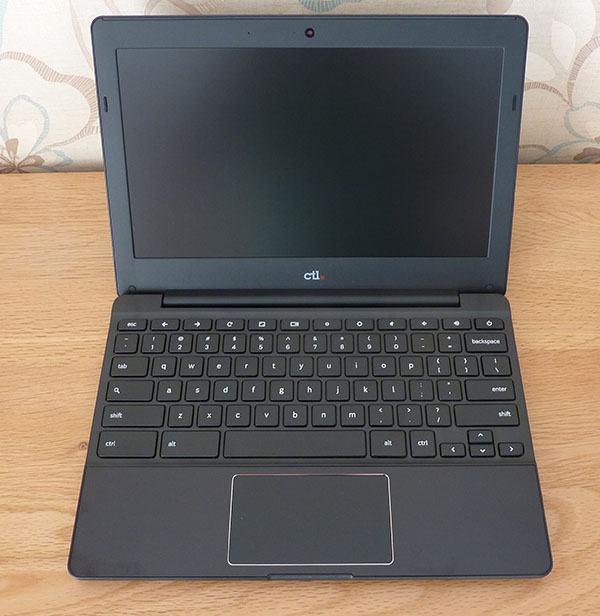
The smooth hinge goes back about 120° revealing an 11.6in display with large bezels on all sides. Premium Chromebooks look more like expensive laptops, but at the cheaper end of the market the design has barely changed over the past decade. But hey, it works well enough for its intended market.
The + suffix is the differentiator between this and an otherwise similar Chromebook from the CTL stable. The regular machine also has an 11.6in screen with a native 1,366x768 resolution but it uses a TN display instead. The + model improves this to an IPS screen with wider viewing angles and, in our opinion, considerably better colour reproduction.
It's bright, sharp enough for the modest resolution and a good fit for a budget Chromebook. In a world where children often have higher-resolution tablets as the norm rather than exception, my niece noted that the fidelity wasn't as impressive as her retina-equipped iPad. Yet good enough for basic spreadsheets and some simple word processing? Sure.
The keys offer shallow travel that take a little getting used to if coming from a full-size, discrete keyboard. Optimised for Chrome it misses out the regular Caps Lock key which gives way to Search while the usual function keys are routed instead to common Chrome tasks.
In a similar vein to the Chromebook Flip, the trackpad is solid. It also supports Chrome gestures and has a satisfying click each time it's depressed. We'd describe the inputs as generic for an entry-level Chromebook, but do understand that isn't meant in a pejorative sense; the duo work well.
The power-sipping nature of the SoC is a boon for those searching for quietness. A lack of vents hints to silent computing, and it is, with the Rockchip SoC cooled passively. Students coming from a tablet world will appreciate that, in terms of noise, it's no different to what they're accustomed to.
In use
General performance is dictated by the SoC and supporting memory contained within the Chromebook. In concert with the majority of others plying this end of the market, one where Rockchip has a leadership position, applications open quickly and the user experience is smooth and predictable. This isn't a machine for doing anything taxing, mind - the Chrome OS is built for Internet-centric usage - yet playing videos, opening up multiple tabs in simple programs, and calling on Skype does little to push the capabilities of the RK3288C SoC.
For those that haven't used a Chromebook of late, think of the performance as analogous to a mid-range smartphone of this year. It's never electric, as on the latest PCs or high-end phones, but neither is it slow at any task you would commonly undertake.
More pertinently, it's quick enough for the education market for which this model is primed. Rather than conduct looping battery tests, we used the J4+ over the course of a weekend, doing the usual browsing and video playback, and noted that it kept going for approximately 10 hours before running out of juice.
A simple machine with a simple premise of appealing to a broad educational market, the CTL J4+ is a solid Chromebook arriving with an attractive bulk price of under $200. It strikes all the right notes for an entry-level Chromebook powered by the ever-popular Rockchip RK3288C SoC. Pricing, though, remains absolutely key, as more feature-filled models are available for a little more, while the absolute budget end, based on the same chassis, starts at just $150. Tablets, too, offer a similar level of performance, albeit without physical keyboard, for less money.
The evolution of mobile SoCs has meant that adequate performance can be gained by spending a very reasonable amount of money. A case in point is the Rockchip RK3288C, widely seen in these devices, and with enough grunt and longevity to run everyday tasks for well, all day. CTL naturally takes this on with the J4+ education-focussed Chromebook equipped with a solid IPS display and surprisingly decent build quality.
Available to purchase to regular consumers for $189 at present, it represents good value in a congested marketplace. If your heart is set on a Chromebook and require a solid machine that covers all the basics, the CTL J4+ is a good starting point.
Pre:Rockchip Newly-released Flagship Chip RK3399 , Best Choice for VR all-in-one! Next:Six technological innovation in tablet! Analysis of Rockchip flagship RK3399
Rockchip Electronics Co., Ltd. All rights reserved
閩ICP備19006074號-1  閩公網安備 35010202001061號